
| Firewall Net | tests, install & configure |
|---|---|
|
|
| Choose | |
| ? Firewall-Net | |
| ? Test | |
| ? Install | |
| ? Configure | |
| ? LAN | |
| ? FAQ | |
| ? Scan Test | |
| Firewall Windows | |
| . | Look'n'Stop |
| . | Kerio Personal Firewall |
| . | Outpost Pro |
| . | McAfee Desktop Firewall |
| . | Xelios Personal Firewall |
| . | Zonealarm Pro |
| . | Norton Personal Firewall |
| . | ZoneAlarm Free |
| . | Sygate Personal Firewall |
| . | Netbarrier 2003 |
| . | Deerfield Personal Firewall |
| . | Tiny Personal Firewall |
| . | Private Firewall |
| . | Atguard |
| . | Steganos Online Shield |
| Firewall Linux | |
| . | iptables |
| Firewall Mac | |
| . | Netbarrier |
| . | Other |
| Security, tools | |
| . | Wingate |
| . | BlackIce |
| . | Nuke |
| . | Backdoors |
| ? Check | |
| ? Compare | |
| ? Directory | |
| ? Forum | |
| ? Thanks | |
| ? Statistics | |
| Contact Firewall Net | |
| . | |
Configuration of your LAN to use with Winroute |
| " NAT " Routing " Local conf |
|
|
|
Configuration of a classical LAN : |

|
|
We suppose that : Your LAN's address is (class C) : 192.168.1 (mask 255.255.255) |
|
|
1 - Winroute-PC should at least have 2 network attachmentsCheck that the Winroute PC has 2 network interfaces (at least) : one for Internet (which can be a modem or a RAS) and one for your local network.
|
2 - Check that all IP addresses are pingableTo allow good Winroute operations, check that all your local PC can "ping" each otherand also with the network attachment of the Winroute-PC. Check also that the Winroute-PC can ping any internet address. |
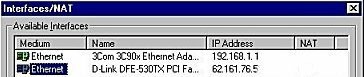
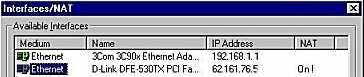
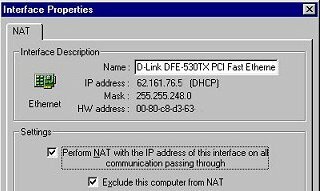
3 - Valid the NAT on the Winroute-PCEnsure that you have checked NAT interface connected to Internet (only this one) on the management window, usable through menu Settings=> Interface Table from Winroute administration interface.
|
4 - Deactivate NAT on the internal interfaceCheck that NAT is unchecked on all interfaces connected to your local network (it should not appear as On on the upper window). |
5 - No gateaway configured on your local interface of the Winroute-PCCheck that there's no default gateaway configured on the interfaces connected to your local network on the Winroute-PC. To do such you can use winipcfg (Start Menu => Run =>winipcfg) or ipcofnig in the COMMAND.COM window, and select the coressponding network interface : 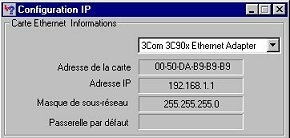 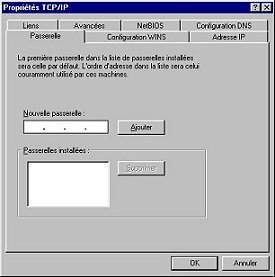 |
6 - Configure forwarding optionsVerify that you have check DNS forwarding, in the menu Settings=> DNS Forwarder. 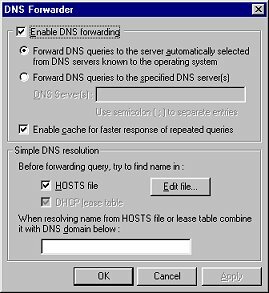 |
7 - On each the internal PC internes configure the default gateawayThe Winroute-PC act as the default gateaway for all the computers on your local network. This means that you must use the internal address of your Winroute-PC as gateaway for each of your internal computers (clients). This is done on each of them if they have a static address, or in the configuration management of your DHCP server (Winroute ?) if they have a dynamic address. 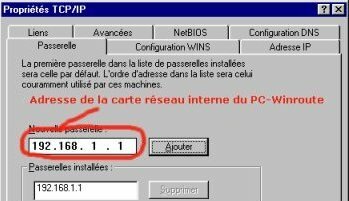 |
8 - On each the internal PC configure the DNS serverThe Winroute-PC act like a DNS server (except for itself) for all the internal computers of your local networkl. This means that you must use the internal interface address of your Winroute-PC as DNS server address. This is done on each of them, or in the configuration management of your DHCP server (Winroute ?). 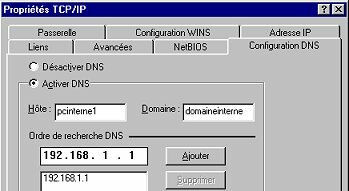 |
|
|
|
You can now use your internal computers as if they were directly connected to Internet, you don't need a proxy or another configuration. |
| Warning ! At this step if you haven't made any other configuration none of your local computer is protected ! |
|
|
|
If you have problems |
| This site is copyright © Chryjs 1999-2003, all copies forbidden. | |||
 read the FAQ